- Part 6: Deploying vSphere with Kubernetes - Provisioning and Managing a Tanzu Kubernetes Cluster
Part 6: Deploying vSphere with Kubernetes - Provisioning and Managing a Tanzu Kubernetes Cluster
vSphere 7 with Kubernetes is finally here and I couldn’t be more excited for it to be available. This blog series will cover the requirements, prequisites and deployment steps in order to deploy a vSphere with Kubernetes (vk8s) environment using vSphere 7 and NSX-T 3.0.
Now that we have the environment deployed, what can we do with it? This blog will cover deploying and using Tanzu Kubernetes Clusters (TKC). You can follow along in the official documentation
Provisioning Tanzu Kubernetes Clusters
In our previous blog we covered the setup of the TKC Content Library, lets validate our namespace can see the images.
Authenticate to your vk8s cluster.
kubectl vsphere login --server 10.21.234.65 --vsphere-username administrator@vsphere.local --insecure-skip-tls-verify
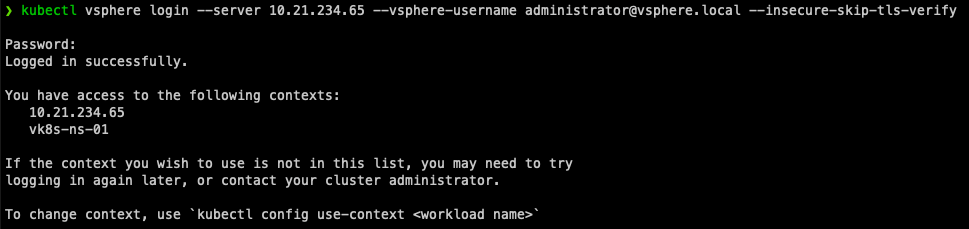
Once logged in you will be shown the contexts aka namespaces you have access to. Lets switch to our namespace.
kubectl config use-context vk8s-ns-01
Execute the following to see what images are available.
kubectl get virtualmachineimages

Execute the following to see what size TKC nodes we can deploy.
kubectl get virtualmachineimages

From the above information we gathered we can now construct a YAML file to deploy our Tanzu Kubernetes Cluster. An example is available on GitHub.
The only items you should need to modify are the Name and Namespace for your TKC.
apiVersion: run.tanzu.vmware.com/v1alpha1 #tkg api endpoint
kind: TanzuKubernetesCluster #required parameter
metadata:
  name: vk8s-tkc-01 #cluster name, user defined
  namespace: vk8s-ns-01 #supervisor namespace
spec:
  distribution:
    version: v1.16 #resolved kubernetes version
  topology:
    controlPlane:
      count: 1 #number of master nodes
      class: guaranteed-small #vmclass for master nodes
      storageClass: vk8s-storage #storageclass for master nodes
    workers:
      count: 3 #number of worker nodes
      class: guaranteed-small #vmclass for worker nodes
      storageClass: vk8s-storage #storageclass for worker nodes
You can also deploy multiple TKC’s in a single YAML if you want, an example is available on GitHub.
Nowe we are ready to deploy your TKC!
kubectl apply -f create-tkc-cluster.yaml

To monitor the status of your TKC Deployment I recommend following the events.
kubectl get events -w

To Authenticate with our TKC execute the following command.
kubectl vsphere login --server 10.21.234.65 --vsphere-username [email protected] --insecure-skip-tls-verify --tanzu-kubernetes-cluster-name tkc-01 --tanzu-kubernetes-cluster-namespace vk8s-ns-01
To validate its ready you can run
kubectl get nodes

Managing Tanzu Kubernetes Clusters
To Authenticate with our TKC execute the following command.
kubectl vsphere login --server 10.21.234.65 --vsphere-username administrator@vsphere.local --insecure-skip-tls-verify --tanzu-kubernetes-cluster-name tkc-01 --tanzu-kubernetes-cluster-namespace vk8s-ns-01

Change Context to your TKC.
kubectl config use-context tkc-01

Deploy your Workload! My favorite non-native pod demo application is the Hipster Shop!
kubectl apply -f demo-hipstershop.yaml

Wait for all pods to be in a Running Status and then find out the External-IP and see if you can reach your application.
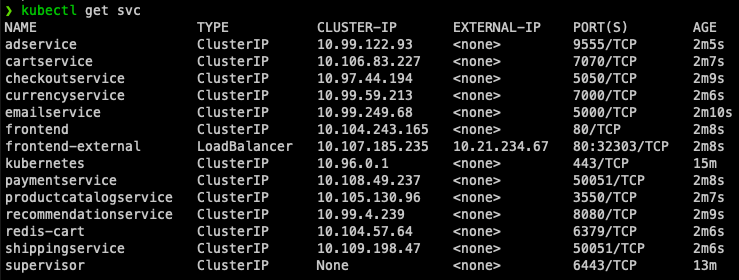
If your pods fail to run, you may need to modify the cluster RBAC and Pod Security Policies using this YAML.
kubectl apply -f allow-runasnonroot-clusterrole.yaml
If everything was successful we can see our running application!

Wrap Up
Running TKC’s allow you to provision Kubernetes Clusters that can run any workload as they are k8s compliant! I hope you have been enjoying this series so far. What would you like to see next?
comments powered by DisqusSee Also
- Part 5: Deploying vSphere with Kubernetes - Using vSphere with Kubernetes
- Part 4: Deploying vSphere with Kubernetes - Enabling vSphere with Kubernetes
- Part 3: Deploying vSphere with Kubernetes - Deploy and Configure NSX-T
- Part 2: Deploying vSphere with Kubernetes - Configuring vCenter Server
- Part 1: Deploying vSphere with Kubernetes - Prerequisites