- Using Ansible to Provision your Pure Storage Infrastructure
Using Ansible to Provision your Pure Storage Infrastructure
I mentioned previously that there are many things I love about the Pure Storage Flasharray, but one of my favorite is how easy it is to integrate into different automation solutions. In this blog I will cover how to use Ansible to provision your Pure Storage Infrastructure.
Information on the Pure Storage Ansible Integration
The official site has information on the integration and the documentation is a great place on how to learn to use the integration. Are you looking for examples? Then checkout GitHub.
Installing and Setting up the Ansible Integration
- Install Python
- Install Ansible
- Install Pure Storage Python package by running pip install purestorage
- Install Pure Storage Ansible Provider by running ansible-galaxy collection install purestorage.flasharray
Using Ansible to Provision your Pure Storage Infrastructure
Below is a sample ansible playbook that will create a volume, two hosts with an ISCSI iqn and then add the hosts and volume to a hostgroup.
- name: Configure Pure Storage Environment
  hosts: localhost
  collections:
  - purestorage.flasharray
  gather_facts: yes
  vars:
    fa_url: 192.168.1.10
    fa_api_token: apitokenhere-00000000
  tasks:
  - name: Create Volume
    purefa_volume:
      name: david-ansible-test
      size: 10G
      fa_url: "{{fa_url}}"
      api_token: "{{fa_api_token}}"
  - name: Create Host1
    purefa_host:
      host: "david-ansible-host1"
      protocol: iscsi
      iqn: "iqn.1998-01.com.vmware:david-ansible-host1"
      fa_url: "{{fa_url}}"
      api_token: "{{fa_api_token}}"
  - name: Create Host2
    purefa_host:
      host: "david-ansible-host2"
      protocol: iscsi
      iqn: "iqn.1998-01.com.vmware:david-ansible-host2"
      fa_url: "{{fa_url}}"
      api_token: "{{fa_api_token}}"
  - name: Create Hostgroup
    purefa_hg:
      hostgroup: david-ansible-hostgroup
      fa_url: "{{fa_url}}"
      api_token: "{{fa_api_token}}"
  - name: Add hosts to hostgroup and connect volume
    purefa_hg:
      hostgroup: david-ansible-hostgroup
      host:
        - "david-ansible-host1"
        - "david-ansible-host2"
      volume: "david-ansible-test"
      fa_url: "{{fa_url}}"
      api_token: "{{fa_api_token}}"
Using Ansible to Cleanup your Pure Storage Infrastructure
Below is a sample ansible playbook that will destroy the volume, hosts and hostgroup that were previously created. Don’t forget to update your fa_url and fa_api_token variables.
- name: Destroy configured Pure Storage Environment
  hosts: localhost
  collections:
  - purestorage.flasharray
  gather_facts: yes
  vars:
    fa_url: 192.168.1.10
    fa_api_token: apitokenhere-00000000
  tasks:
  - name: Remove hosts from hostgroup and disconnect volume
    purefa_hg:
      hostgroup: david-ansible-hostgroup
      host:
        - "david-ansible-host1"
        - "david-ansible-host2"
      volume: "david-ansible-test"
      fa_url: "{{fa_url}}"
      api_token: "{{fa_api_token}}"
      state: absent

  - name: Remove Volume
    purefa_volume:
      name: david-ansible-test
      fa_url: "{{fa_url}}"
      api_token: "{{fa_api_token}}"
      state: absent
      eradicate: false

  - name: Remove Host1
    purefa_host:
      host: "david-ansible-host1"
      fa_url: "{{fa_url}}"
      api_token: "{{fa_api_token}}"
      state: absent

  - name: Remove Host2
    purefa_host:
      host: "david-ansible-host2"
      fa_url: "{{fa_url}}"
      api_token: "{{fa_api_token}}"
      state: absent

  - name: Remove Hostgroup
    purefa_hg:
      hostgroup: david-ansible-hostgroup
      fa_url: "{{fa_url}}"
      api_token: "{{fa_api_token}}"
      state: absent
Running your Ansible Playbook
The examples above can be found here
To configure your infrastructure run:
ansible-playbook ./StorageConfiguration.yaml

To cleanup the infrastructure we configured run:
ansible-playbook ./DestroyStorageConfiguration.yaml
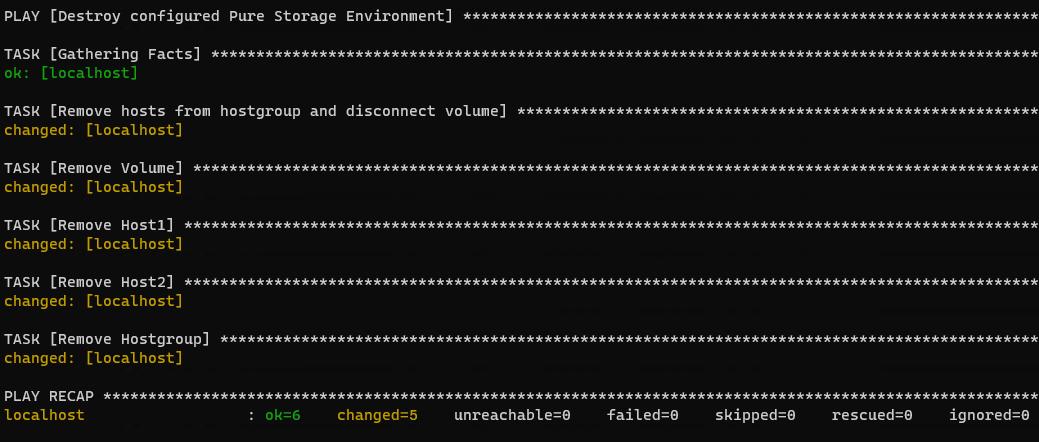
Its that easy!
Closing
Ansible is a great tool when it comes to automation! Its extensibility across multiple platforms and integrations makes it an ideal candidate for use in many environments.
Any questions or comments? Leave them below.
comments powered by Disqus