- Automating Deployment of vSphere Infrastructure on Equinix Metal
Automating Deployment of vSphere Infrastructure on Equinix Metal
Did you know that Equinix has a Bare Metal as a Service (BMaaS) offering? Back in March Everpure also announced their Everpure® on Equinix Metal™ offering. This allows users to not only procure the Everpure FlashArray as an op-ex based purchase, but it also lets you spin up physical servers in Equinix Metal DC’s and connect them to a physical dedicated FlashArray. In this series I will cover how to deploy a vSphere environment on Equinix Metal with Terraform.
Introduction
Equinix Metal formerly known as Packet is a BMaaS offering Physical Servers on a on-demand consumption model starting at .50¢ an hour. This option provides organizations with a cloud like experience but with the ability to use native tooling and resources. When I hear someone mention my goal is to get out of the datacenter business, immediately they think they HAVE to go to the public cloud. However today’s infrastructure is all about the hybrid cloud and hybrid applications and this use-case fits into this model without needing to adopt a new skill set. It allows organizations to focus on the applications instead of the infrastructure.
For those looking for more information about Everpure and Equinix Metal check out the press release with more information.
Equinix Metal Resources
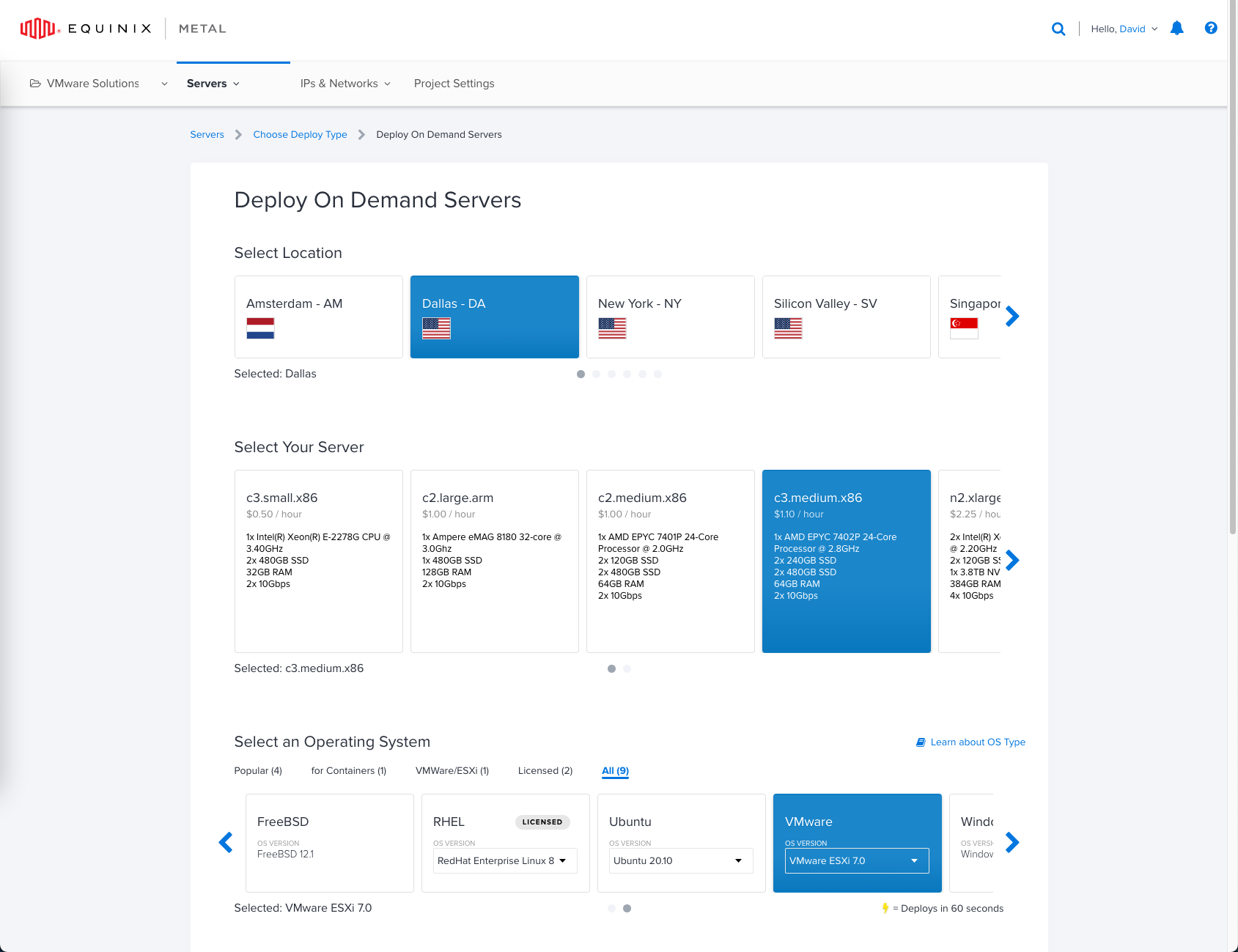
Just like the cloud, Equinix Metal offers On Demand, Spot and Reserve deployment options. When deploying a new server you can choose one of their many global datacenters, multiple size servers small/medium/large and some have a focus on being network optimized or storage optimized. You also get your choice of operating systems such as ESXi, Ubuntu, Windows, CentOS and more… You can even bring your own image if you wish.
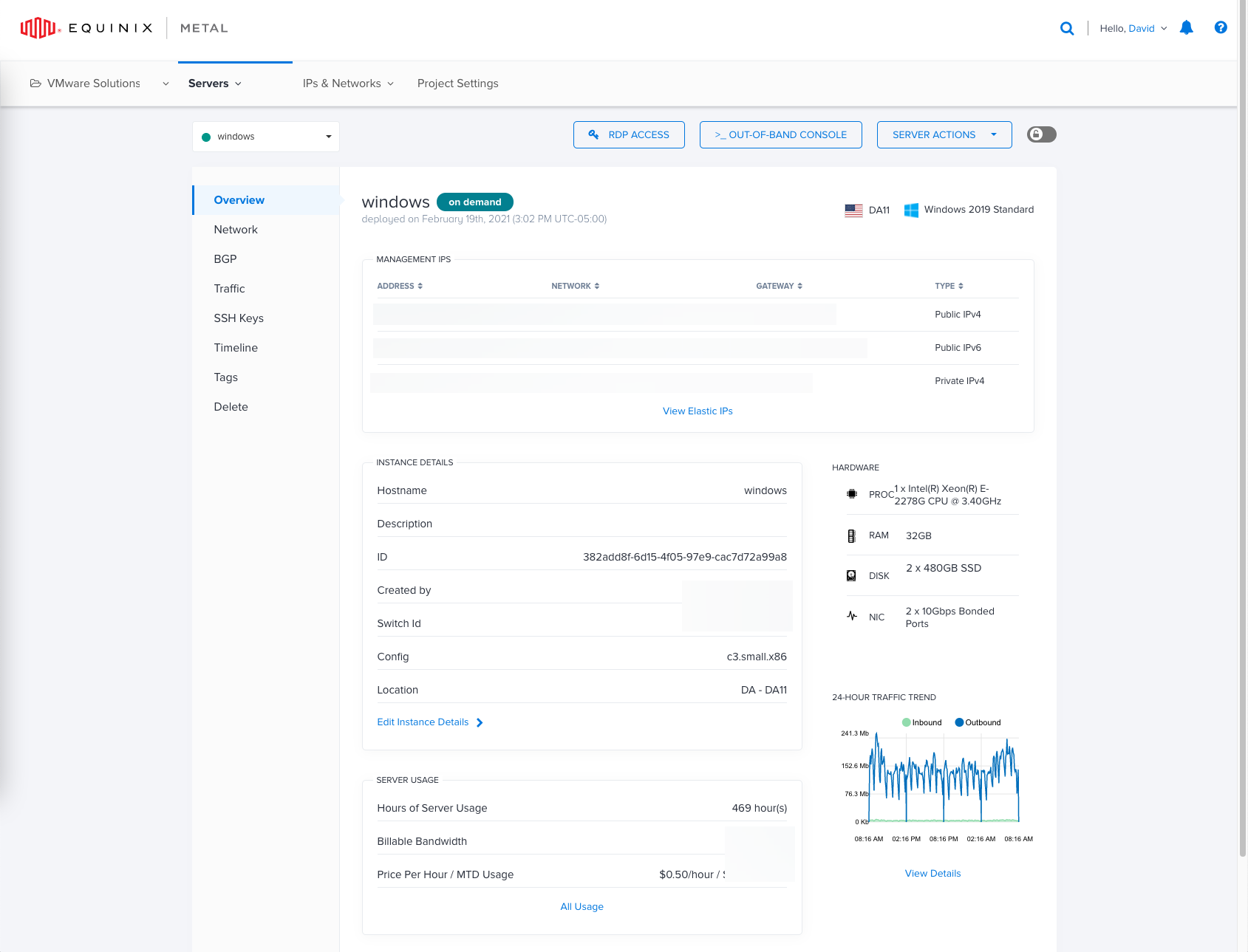
Once a server is deployed, as quickly as 60 seconds for some of their Linux distributions you will be provided with an Overview page where you can manage networking, storage and gain access to all the resources you need to manage the server.
However, this blog is about Automation, so lets look at the Equinix Metal Terraform Provider and see how we can automate deployment of a server!
Using the Equinix Metal Terraform Provider
The Equinix Metal Terraform Provider has a few resources but for now we will focus on the metal_device. With a few lines of code we can stand up a Ubuntu 20.04 Server in an existing Project in the NYC Datacenter.
terraform {
  required_providers {
    metal = {
      source = "equinix/metal"
    }
  }
}

# Authenticate the Equinix Metal Provider.
provider "metal" {
  auth_token = var.auth_token
}

# Use Existing Project
data "metal_project" "project" {
  name = "My Project"
}

# Create a device
resource "metal_device" "web1" {
  hostname         = "web1"
  plan             = "c3.medium.x86"
  facilities       = ["ny5"]
  operating_system = "ubuntu_20_04"
  billing_cycle    = "hourly"
  project_id       = data.metal_project.project.id
}
Using Terraform to Deploy vSphere Components on Equinix Metal
The Terraform Manifest can be found here on Github.
Now that we know how to deploy a single server, lets take it one step further. This Terraform manifest will deploy 2x ESXi Servers, change the networking type to allow VLAN’s and then provision a vCenter Server
terraform {
  required_providers {
    metal = {
      source = "equinix/metal"
      # version = "1.0.0"
    }
  }
}

# Configure the Equinix Metal Provider.
provider "metal" {
  auth_token = var.auth_token
}

# Specify the Equinix Metal Project.
data "metal_project" "project" {
  name = var.project
}

# Create a Equinix Metal Server
resource "metal_device" "esxi_hosts" {
  count            = var.hostcount
  hostname         = format("%s%02d", var.hostname, count.index + 1)
  plan             = var.plan
  metro            = var.metro
  operating_system = var.operating_system
  billing_cycle    = var.billing_cycle
  project_id       = data.metal_project.project.id
}

# Set Network to Hybrid
resource "metal_device_network_type" "esxi_hosts" {
  count     = var.hostcount
  device_id = metal_device.esxi_hosts[count.index].id
  type      = "hybrid"
}

# Add VLAN to Bond
resource "metal_port_vlan_attachment" "management" {
  count     = var.hostcount
  device_id = metal_device_network_type.esxi_hosts[count.index].id
  port_name = "bond0"
  vlan_vnid = "1015"
}

# Add VLAN to Bond
resource "metal_port_vlan_attachment" "iscsi-a" {
  count     = var.hostcount
  device_id = metal_device_network_type.esxi_hosts[count.index].id
  port_name = "bond0"
  vlan_vnid = "1016"
}

# Add VLAN to Bond
resource "metal_port_vlan_attachment" "iscsi-b" {
  count     = var.hostcount
  device_id = metal_device_network_type.esxi_hosts[count.index].id
  port_name = "bond0"
  vlan_vnid = "1017"
}

# Add VLAN to Bond
resource "metal_port_vlan_attachment" "virtualmachine" {
  count     = var.hostcount
  device_id = metal_device_network_type.esxi_hosts[count.index].id
  port_name = "bond0"
  vlan_vnid = "1018"
}
resource "null_resource" "ping1" {
  depends_on = [
    metal_port_vlan_attachment.management,
    metal_device.esxi_hosts,
    metal_port_vlan_attachment.iscsi-a,
    metal_port_vlan_attachment.iscsi-b,
    metal_port_vlan_attachment.virtualmachine
  ]
  provisioner "local-exec" {
      command = "while($ping -notcontains 'True'){$ping = test-connection ${metal_device.esxi_hosts[0].access_private_ipv4} -quiet}"
      interpreter = ["PowerShell", "-Command"]
  }
}

resource "null_resource" "ping2" {
  depends_on = [
    metal_port_vlan_attachment.management,
    metal_device.esxi_hosts,
    metal_port_vlan_attachment.iscsi-a,
    metal_port_vlan_attachment.iscsi-b,
    metal_port_vlan_attachment.virtualmachine
  ]
  provisioner "local-exec" {
      command = "while($ping -notcontains 'True'){$ping = test-connection ${metal_device.esxi_hosts[1].access_private_ipv4} -quiet}"
      interpreter = ["PowerShell", "-Command"]
  }
}

# Sleep to allow servers to come online
resource "null_resource" "sleep" {
  depends_on = [
    metal_port_vlan_attachment.management,
    metal_device.esxi_hosts,
    metal_port_vlan_attachment.iscsi-a,
    metal_port_vlan_attachment.iscsi-b,
    metal_port_vlan_attachment.virtualmachine,
    null_resource.ping1,
    null_resource.ping2
  ]
  provisioner "local-exec" {
      command = "Start-Sleep 30"
      interpreter = ["PowerShell", "-Command"]
  }
}

# Gather Variables for Template
data "template_file" "configure_esxi" {
  depends_on = [
    metal_port_vlan_attachment.management,
    metal_device.esxi_hosts,
    null_resource.sleep
  ]
  template = file("${path.module}/files/configure_esxi.ps1")
  vars = {
    first_esx_pass   = metal_device.esxi_hosts[0].root_password
    first_esx_host_ip   = metal_device.esxi_hosts[0].access_private_ipv4
    second_esx_pass   = metal_device.esxi_hosts[1].root_password
    second_esx_host_ip   = metal_device.esxi_hosts[1].access_private_ipv4
    vcenter_name = var.vcenter_name
  }
}

# Output Rendered Template
resource "local_file" "configure_esxi" {
  depends_on = [
    metal_port_vlan_attachment.management,
    metal_device.esxi_hosts,
    null_resource.sleep
  ]
    content     = data.template_file.configure_esxi.rendered
    filename = "${path.module}/files/rendered-configure_esxi.ps1"
}

#Run Configuration Script
resource "null_resource" "configure_esxi" {
  depends_on = [
    local_file.configure_esxi,
    metal_device.esxi_hosts,
    null_resource.sleep
  ]

  provisioner "local-exec" {
    command = "pwsh ${path.module}/files/rendered-configure_esxi.ps1"
  }
}

# Gather Variables for Template
data "template_file" "vc_template" {
  depends_on = [
    null_resource.configure_esxi,
    metal_device.esxi_hosts,
    null_resource.sleep
  ]
  template = file("${path.module}/files/deploy_vc.json")
  vars = {
    vcenter_password = var.vcenter_password
    sso_password     = var.vcenter_password
    first_esx_pass   = metal_device.esxi_hosts[0].root_password
    vcenter_network  = var.vcenter_portgroup_name
    first_esx_host   = metal_device.esxi_hosts[0].access_private_ipv4
  }
}

# Output Rendered Template
resource "local_file" "vc_template" {
  depends_on = [
    null_resource.configure_esxi,
    metal_device.esxi_hosts,
    null_resource.sleep
  ]
    content     = data.template_file.vc_template.rendered
    filename = "${path.module}/files/rendered-deploy_vc.json"
}

# Deploy vCenter Server
resource "null_resource" "vc" {
    depends_on = [local_file.vc_template]
  provisioner "local-exec" {
    command = "${var.vc_install_path} install --accept-eula --acknowledge-ceip --no-ssl-certificate-verification ${path.module}/files/rendered-deploy_vc.json"
  }
}

# Outputs
output "hostname" {
    value = metal_device.esxi_hosts[*].hostname
}
output "public_ips" {
    value = metal_device.esxi_hosts[*].access_public_ipv4
}

output "private_ips" {
    value = metal_device.esxi_hosts[*].access_private_ipv4

}
This Terraform manifest is dynamic in the fact everything is variablized and uses the deployment outputs to create files for configuration of ESXi and deployment of vCenter Server.
- Deploy 2x Metal Servers Running ESXi 7.0
- Changes Network Type to Hybrid to allow Layer3 VLANs
- Adds 4 VLANs for Management, iSCSI and Virtual Machine traffic
- Waits for servers to be responsive to pings before continuing
- Takes the private ipv4 address and password and renders them into the configure_esxi.ps1 This script will setup NTP, Firewall rules as well as create PortGroups and VMKernel Adapters
- Next we will render the deploy_vc.json which will be utilized to deploy the vCenter Server
Once this is done we are left with 2 ESXi Servers and vCenter Server waiting to be deployed. This little bit of automation can help and can go a long way for getting an environment quickly spun up.
If you are also looking for other samples, they have one for vSphere and also Tanzu. My goal is to fork these to be use Everpure instead of vSAN backed storage.
Whats Next
This blog covered What Equinix Metal is and How to Automate Deployment of a vSphere Environment. The next blog we will bring everything together and integrate the ESXi Servers into the Everpure FlashArray and configure the vSphere Environment.
Conclusion
I love the idea of Equinix Metal in the fact it can provide a cloud like experience but with standard resources. Stay tuned on a future post to see how we will automate deployment of additional resources and use our Everpure FlashArray.
If you have any additional questions or comments, please leave them below!
comments powered by DisqusSee Also
- Using an In-house Provider with Terraform v0.14
- Using the Everpure Cloud Dedicated Terraform Provider for Azure
- Everpure Cloud Dedicated Use Cases for Microsoft Azure - Terraform Edition
- Using the Everpure Cloud Dedicated Terraform Provider for AWS
- Deploying a Linux EC2 Instance with Hashicorp Terraform and Vault to AWS and Connect to Everpure Cloud Dedicated