Collect Nutanix VM vDisk and Map to Pure Storage Volumes and Snapshots
Nutanix with FlashArray is Now Generally Available! With this initial release, Nutanix now has a new External Storage Platform with Pure Storage connecting over NVMeoF/TCP. This integration uses volume granular storage which means every vDisk from Nutanix gets created as a Pure Storage volume. This series will outline how to identify a vDisks associated volume and snapshot on a Pure Storage FlashArray.
1/22/26 - Updated Blog with v2.0.0 of the Script
Prerequisites
Introduction
There may be a need to to identify its backing volume or snapshot. Unfortunately in the initial release this was not made available in the UI. However, this script is able to utilize the Pure Storage Volume tags to identify the associated objects volumes. Using the script you can filter all VM’s, specific VM’s, snapshots and metadata disk information.
Usage
Follow the below step to collect the Nutanix vDisk information.
- Configure Prism Credentials.
$prismcred = Get-Credential
- Configure Array Credentials.
$arraycred = Get-Credential
Using Powershell, run the following command(s)
Execute the script.
./GetVMVol.ps1 -ArrayEndpoint $ArrayEndpoint -PrismEndpoint $PrismEndpoint -ArrayCredential $arraycred -PrismCredential $prismcred
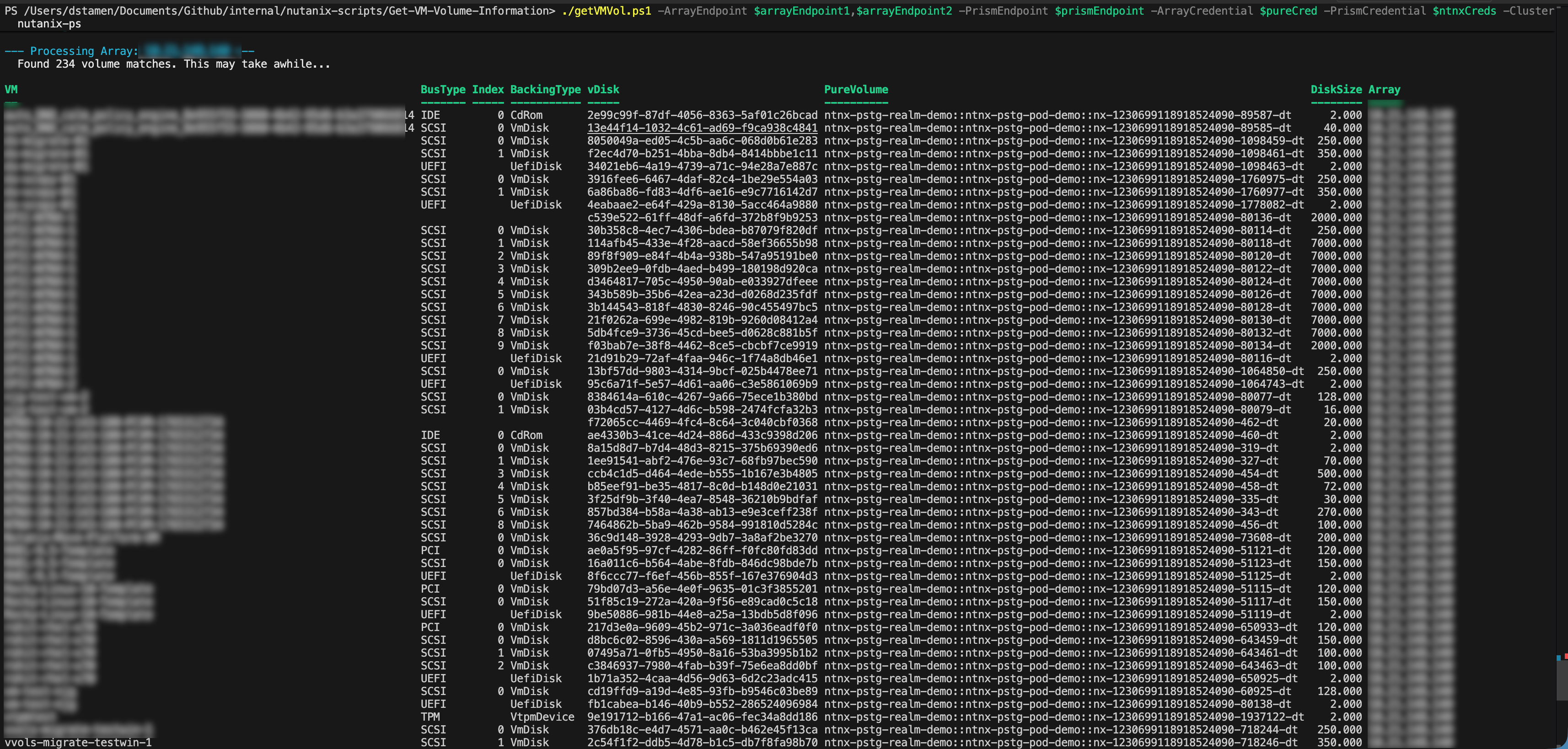
-Cluster <CLUSTERNAME> (OPTIONAL) - To Show Specific Cluster’s Details
-VM <VMNAME> (OPTIONAL) - To Show Specific VM’s Details
-showSnapshots $true (OPTIONAL) - To Show VM’s Snapshots
-showMetadata $true (OPTIONAL) - Show VM’s Metadata Disks
Examples
Display All VM’s and Disks
./GetVMVol.ps1 -ArrayEndpoint $ArrayEndpoint -PrismEndpoint $PrismEndpoint -ArrayCredential $arraycred -PrismCredential $prismcred -showMetadata $true

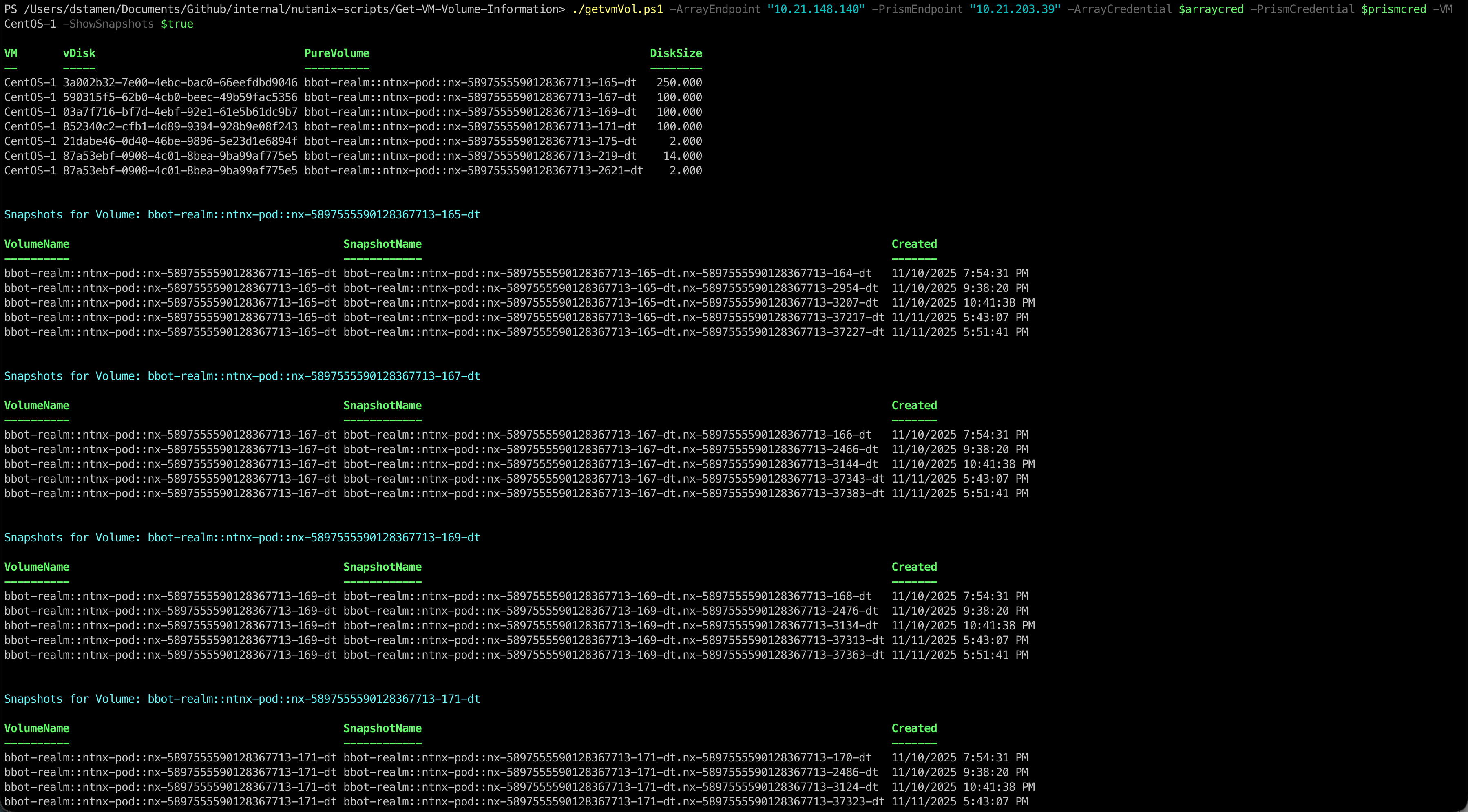
Display VM’s Disks and Snapshots
./GetVMVol.ps1 -ArrayEndpoint $ArrayEndpoint -PrismEndpoint $PrismEndpoint -ArrayCredential $arraycred -PrismCredential $prismcred -showSnapshots $true
Display Cluster’s VM’s Disks and Snapshots
Conclusion
That’s it! Hopefully this post is helpful to allow you to map a Nutanix VM’s vDisk back to a Pure Storage Volume and Snapshot.
If you have questions or feedback, feel free to leave a comment below!
comments powered by DisqusSee Also
- The Power of PowerShell: Calculating Azure VMware Solution (AVS) Costs
- Build and Publish a Powershell Module to the Powershell Gallery
- Using Pure1 Meta for Intelligent Datastore Selection and VM Provisioning
- Deploying a EC2 Instance with PowerShell to AWS
- Installing and Updating the Pure Storage vSphere Plugin